Showing posts with label mapping. Show all posts

Thursday, June 24, 2010

New Topographic Map Formats

While looking for a map on the US Geological Survey site today I found a new format of topographic maps. Previously it was easy to download a scanned topographic map in pdf format. Today I noticed that for some regions there is a new kind of map called a US Topo. It has a true color aerial photo for a base with all the usual topographic map features on top.

For example, below is a part of the Iron Springs 7.5 minute map showing the Waynesboro Reservoir, which was made in 1995.
Following is the June 2010 version of the same area.
For some maps there is a Digital Maps beta version that doesn't yet have the contour lines. The new maps can be purchased in paper format. Even better is the pdf format. The data in the new maps can be separated in the reader, just like in a GIS. When you install the free TerraGo add-on in Adobe Reader you can make measurements of direction and distance directly on the map. Very Cool! It is all available at http://store.usgs.gov Topographic maps will never be the same again!

Thursday, October 15, 2009

Use Google Maps Street View to Demonstrate Forest Management Activities

Normally you wouldn't think of Google Maps Street View as a helpful tool for forestry. Most of the scenes are concentrated in urban areas, where the people are. However, Google has been sending its cars out from the city centers to the rural areas. This can provide a good opportunity to illustrate forestry operations in an embedded map view.

For example, this scene shows the aftermath of a pine plantation removal operation in the Waynesboro Watershed in Hamiltonban Township, PA. The site has been treated with herbicides to remove invasive plants and shrubs. Most of it has been replanted, although none of the seedlings are yet visible.


As with all Google Maps views this one can be opened to its own screen for viewing or manipulated in its own window.

Further along the same road a deer fence was put in place to protect hardwood regneration in a stand where diseased hemlock and overtopped trees were removed several years previously. Use the map controls to pan up and see the canopy opening. (Click on the map and move the view around.)
This last view shows the PA Bureau of Forestry Ralph Brock Seed Orchard along Rte 233. The pines here have been topped to concentrate cone production on the lower branches. This treatment mystifies people who drive by until the purpose is explained to them!

Tuesday, November 11, 2008

New GPS Model

Today we started using the new Garmin GPS model 60 receivers. These units have USB connections in addition to the serial ports, which is nice. They seem to work quicker than the older model 76 receivers that we have been using. They also have better graphics. And they have GPS related games! We will continue to use the older GPS units, but it is nice to have the new equipment, too.

Posted by Picasa

Friday, July 04, 2008

Wildfire Maps

This year's fire season began with unusually fierce and intense fires, especially in Northern California. The California Department of Forestry and Fire Protection has put together an interactive Google Map showing the status of active and contained fires and emergency services. The map can be seen here.

The US Forest Service Remote Sensing Application Center has put together a number of maps in its Modis Active Fire Mapping Program. The site includes a number of imaging products including interactive ArcIMS maps and Google Earth downloads. Complete data on the fires is also available.

With more people moving into rural areas, the increase in forest fuels, and the capricious climate the problem of widlfires will be with us for a long time. Fortunately, we have reliable real time sources of information with which to study the fires and come up with solutions.

Thursday, April 03, 2008

Contour Lines Added to Google Maps

I saw in the Google LatLong blog yesterday that Google has added contour lines to the terrain view. This capability was added by , a Google intern. Follow this link to the blog posting.

Here is a map I made of Mount Washington in New Hampshire:


View Larger Map

Mount Washington is the highest point on the east coast of the USA.

I am not sure how they select the contour interval. It seems to be 40 feet.

Here is another map of the Waynesboro Reservoir:


View Larger Map

This one also seems to have a 40 foot interval, too. It will be interesting to check other regions, such as the Rockies. I do like the effect of contours and shading to show elevation. This is a great option. It turns the online maps into much more of a professional tool.

Thursday, December 27, 2007

GPS satellite developments


GPS World discusses Russia's recent launch of three more GLONASS satellites. This brings the total available satellites to 18, enough for navigation in Russia. Russia hopes to have a complete constellation of GPS satellites working by 2009. There was a recent news story of President Putin with his dog showing how a GLONASS-based GPS tracking device was now possible.

This follows last week's successful launch of a new GPS satellite, also described in GPS World. The new GPS IIR-18 (M) satellite will replace an existing older unit. It provides a stronger civilian signal and some new capabilities for military navigation.

This news is exciting for anyone interested in GPS. Within a few years we will have the choice of receivers using NAVSTAR (American), Galileo (European), or GLONASS (Russian). There will certainly be combinations of the different systems for even better accuracy and reliability. The combinations may be subscription-based for the extra service. I am sure there will be intense competition among providers to provide good deals and packages.

Maybe they will even solve the problem of good reception under a closed forest canopy with a low cost receiver!

Tuesday, September 11, 2007

Interpreting Airphotos in the Field

Yesterday, students in the Aerial Photo Interpretation class (FORT 230) visited selected sites on the aerial photos they are studying. Using the principles of interpretation: shape, shadow, pattern, association, texture, tone/color, and relative size, they compared the scene on the photo with what is actually on the ground today.

Given that the sets of photos we are using were taken in 1977, the element of time must also be included in the interpretation. Some areas have been harvested and others have grow in from previous harvests. Little of the area has changed through human use, however.

Here is a Google map of the sites the class visited:


View Larger Map

Digital pictures were taken at each stop and then geotagged with the location coordinates. Follow this link to see the geotagged images on a Yahoo Map in Flickr. Picasa albums also offers geotagging on a Google map as shown in this link. Each provider and format has its own advantages. There is probably a universal tool out there to combine these into one view.

Monday, June 11, 2007

Mapping Mecca


Say Freeport, ME and people will automatically say LL Bean. But located in Yarmouth on Rte. 1 just outside Freeport is DeLorme, famous for its line of atlas and gazetteers of the 50 states. The company also produces its own GIS, diverse mapping software, and now its own GPS receiver. I visited the Map Store at DeLorme last week and wasn't disappointed. There are a large number of mapping books and tools available. They have the entire series of topographic maps for the State of Maine at 1:20,000. I bought some full-size vinyl map covers, a great way to store maps for viewing. I also got a large size UTM-grid and protractor, useful for plotting with topographic maps.

The best thing about visiting Delorme is seeing the giant globe, Eartha. It's a world record.

Sunday, May 27, 2007

Another Online Mapping Tool

Use A Map

This is a new tool I found on the Ogle Earth Blog . Simply put, use a map lets you create a map location with a simple link address. When you click on the link you then have the option of viewing the map in Google, Yahoo, or MS Live. With new features you can also add pictures and other annotations.

Here is a map I made for Peaks Island, Maine: http://useamap.com/peaks
Here is another for the Penn State Mont Alto campus: http://useamap.com/MontAlto

It's easy to use and a great way to send maps to someone.

Wednesday, May 02, 2007

Mont Alto Hiking Trails

Follow this link, http://tinyurl.com/2j7bto to a map of hiking trails around the Mont Alto Campus made by forest technology student Tom Oliver for the GIS class.

Tom made the map with the new design tools in Google Maps. Very simple to use, all you need to do is navigate to the area you want and use the simple drawing tools. You can then send your map to anyone or even download it to view on Google Earth.

Enjoy!

Sunday, November 12, 2006

Google vs. Yahoo! Imagery


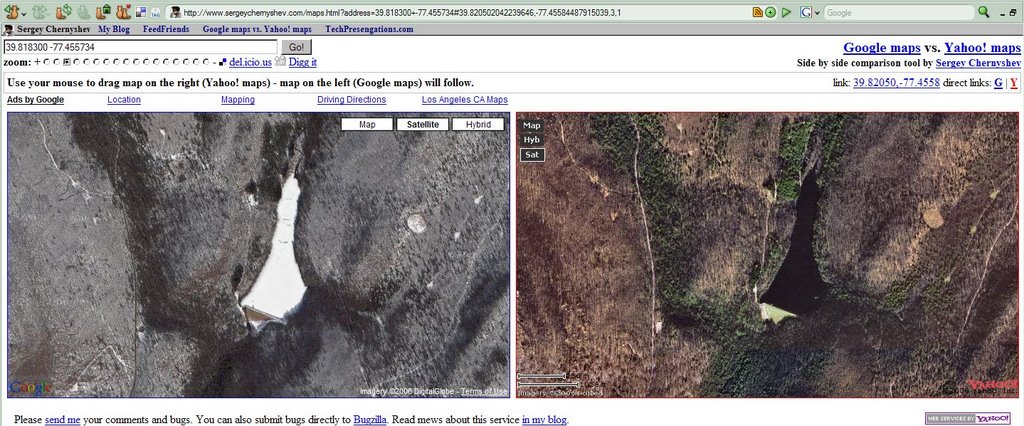
The image above is a screen capture from an amazing map hack by Sergey Chernyshev that puts Google (left) and Yahoo! maps side by side. To get the above comparison of the Waynesboro Reservoir in the Waynesboro Watershed (where we hold many labs in the Penn State Mont Alto forest technology program) first go to this web address: http://www.sergeychernyshev.com/maps.html . Then enter these search coordinates: 39.818300 -77.455734 (latitude and longitude). Make sure to choose satellite imagery to see just the images or hybrid to see the images and roads.

Both images are high resolution, high quality. Online mapping services tend to have spotty coverage of the best imagery around the US. Google shows a winter scene, where the reservoir is frozen. Yahoo! shows a slightly color enhanced summer scene. The road networks use the same data from Navteq. It' great to be able to see them together side by side.

Online mapping is a trend. It's likely that foresters and other natural resource managers will be using these tools in the future to improve their understanding of the forests and to make field work more efficient. Thanks, Sergey, for this new tool.